
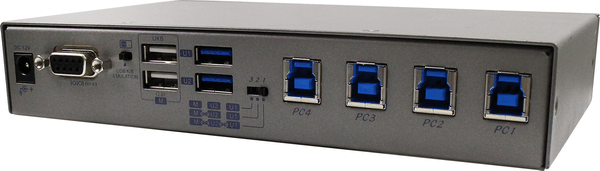
 USW-K334
4-Port USB 3.2 Gen 1 Switch with Hotkey, Serial and IR Control
The USW-K334 connects four host computers to a pool of USB devices, switching them by front-panel buttons, hotkeys, RS-232 or optional IR remote. It has two USB peripheral ports and two keyboard/mouse ports, and port rules let the devices be split into groups. It suits shared labs, test benches and multi-PC desks.
USW-K334
4-Port USB 3.2 Gen 1 Switch with Hotkey, Serial and IR Control
The USW-K334 connects four host computers to a pool of USB devices, switching them by front-panel buttons, hotkeys, RS-232 or optional IR remote. It has two USB peripheral ports and two keyboard/mouse ports, and port rules let the devices be split into groups. It suits shared labs, test benches and multi-PC desks.
USB & KM Switches
Share keyboards, mice and USB devices between computers while each keeps its own monitors. USB 3.2 Gen 1 switches and KM switches with mouse roaming across screens.
USW-K334
4-Port USB 3.2 Gen 1 Switch with Hotkey, Serial and IR Control
The USW-K334 connects four host computers to a pool of USB devices, switching them by front-panel buttons, hotkeys, RS-232 or optional IR remote. It has two USB peripheral ports and two keyboard/mouse ports, and port rules let the devices be split into groups. It suits shared labs, test benches and multi-PC desks.
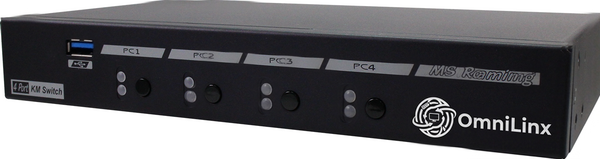 USW-KM314
4-Port KM Switch with USB 3.2 Gen 1, Mouse Roaming and USB Audio
The USW-KM314 lets one keyboard and mouse control four PCs, and the cursor can move between machines by crossing the screen edge. It shares three USB HID devices and two USB 3.2 Gen 1 ports, and handles audio over USB. It is designed for multi-PC desks where all computers must keep processing.
USW-KM314
4-Port KM Switch with USB 3.2 Gen 1, Mouse Roaming and USB Audio
The USW-KM314 lets one keyboard and mouse control four PCs, and the cursor can move between machines by crossing the screen edge. It shares three USB HID devices and two USB 3.2 Gen 1 ports, and handles audio over USB. It is designed for multi-PC desks where all computers must keep processing.
No products match these filters.
Choosing the right model
A KM switch is ideal when every computer already has its own displays and you only want one keyboard and mouse on the desk. USB switches move printers, storage and webcams between hosts on demand.